Guides · AI commercials and advertising
Why does AI video change your product between shots? (and how to stop it)
By Toni RieraArt director and digital retoucher, Toni Riera AI Studio. Published: 18 October 2026.
Short answer
AI video models don’t know your product: they rebuild it in every shot from probabilities, with no 3D model or record of what it really looks like. That’s why the logo changes shape, the label turns illegible or the packaging mutates when the angle changes. The way to avoid it is not to let the AI invent the product: start from real images, composite and retouch the keyframes by hand before animating, and discard any take where the product changes.
What is actually happening
When you generate a shot with an AI video tool (Runway, Kling, Veo, Sora…), the model doesn’t “place” your product in the scene. It generates each frame by predicting which pixels fit your prompt and the reference image. The result looks like your product, but it isn’t your product.
This causes four typical problems:
- The logo and type warp. Small lettering is the hardest detail to keep: the model rebuilds it as shapes, not as text.
- The packaging changes proportions. A bottle narrows, a cap changes colour, a box gains or loses an edge.
- The product mutates between shots. Every new shot is a new generation: even if the product came out right in the first, the model reinterprets it from scratch in the second.
- The product gets “invented” as it turns. When the camera shows a side that wasn’t in the reference image, the model imagines it.

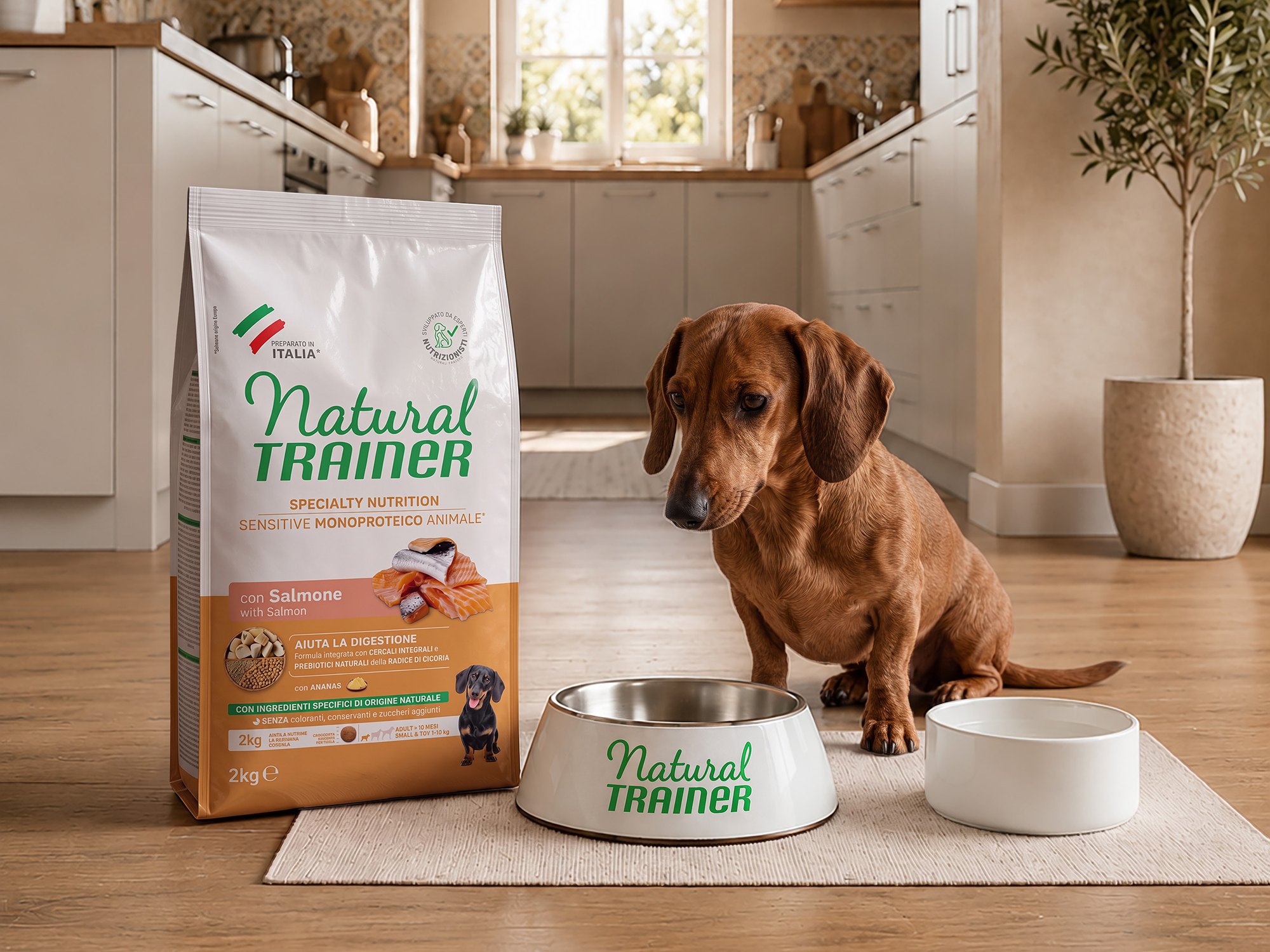 AI outputWith the real product
Why a better prompt won’t fix it
Writing “keep the logo exactly the same” helps little, because the problem isn’t the instructions: it’s how the model works. It can reduce errors, but it can’t guarantee the product is identical in every frame. For a brand, “almost the same” isn’t good enough: a misspelt logo is reason enough not to run the commercial.
How I avoid it: my method
1. I start from the real product, from 3 or 4 angles
I ask for sharp photos of the product from 3 or 4 angles (front, side, back and a close-up of the label or logo), plus renders, packaging files or the vector logo if there are any. The more real angles I have, the less the model has to invent.
If the brand has technical drawings or a 3D model of the product, I build a 3D version so the keyframes are even more accurate. When there isn’t one and the project needs it, especially in automotive, I work with a 3D partner. And when the commercial needs a setting that stays consistent from shot to shot, I build a basic 3D environment as a reference.
2. I composite and retouch the keyframes before animating
Every shot starts as a still: the real product placed in the scene with the right light, reflections and shadows, and with the exact type and logo, retouched by hand in Photoshop. This is the step that makes the biggest difference, because the model starts from a product that is already right instead of imagining it.
3. You approve them before animation
You approve the product, the characters and the setting as stills. Fixing a frame is far quicker and cheaper than fixing a video.
4. I animate in short shots
The longer a shot lasts and the more the camera moves, the further the product drifts from the original. That’s why I work in short shots, from the approved keyframes, and generate several takes of each.
5. I discard takes where the product changes
I don’t try to patch a take where the product has warped: I discard it and generate another from the approved keyframe. Only takes where the product is the real one make it to the edit.
6. I edit for continuity
In the edit I check that the product is the same from one shot to the next: colour, size, logo position and reflections.
Can I do it myself with the tools?
Partly. If the product is simple (no small type, simple shapes) and the commercial has few shots, you can improve the result a lot with reference images, short shots and by discarding the takes that fail.
When the product has type, a complex logo, reflective materials (glass, metal, car paint) or has to be seen from several angles, it needs compositing and retouching by hand. It’s the same reason professional product photography has always gone through retouching.
How I do it at Toni Riera AI Studio
This is exactly my method: the real product, keyframes retouched by hand in Photoshop, approval before animation and only the takes where the product is the real one. In the pilot for Bryan Stepwise, the shoe is the real one, with no shoot.
Frequently asked questions
Why does AI change my brand’s logo in the video?
Because the model rebuilds the logo as a shape in every frame, not as a fixed file. Small lettering and fine details are the first things to warp.
Does a more detailed prompt stop the product from changing?
It reduces errors but doesn’t eliminate them. The model still generates the product from probabilities. To guarantee accuracy you need keyframes with the real product and to discard the takes where the product changes.
Do I need a 3D model of the product?
Not always. With photos from 3 or 4 angles and keyframes retouched by hand, the product stays accurate without 3D. If the brand has drawings or a 3D model, I use it to make the keyframes even more precise, and in automotive I work with a 3D partner when the project needs it.
Which products are hardest?
Those with small type (labels, ingredients), complex logos and reflective materials: glass, metal, cosmetics, cars.
How much does an AI commercial with an accurate product cost?
At Toni Riera AI Studio, a 12–20 second social spot starts at €800 and a 30–60 second campaign spot at €2,500. These are guide prices excluding VAT.
Send me your product. I’ll set it in motion.
Photos, renders or whatever you have. Within 24–48 h I’ll tell you how I’d turn it into video and what it costs.